

Choosing the right server infrastructure is an important decision for businesses that depend on reliable applications, secure data storage, and uninterrupted operations. Two popular options are dedicated servers and cloud servers. While both provide computing resources for business applications, they differ in performance, scalability, management, and cost.
Understanding these differences can help businesses choose the right solution based on their operational needs, budget, and future growth plans.
What Is a Dedicated Server?
A dedicated server is a physical server allocated to a single business or organisation. All its processing power, memory, and storage resources are dedicated to that organisation, offering greater control over server configuration and performance.
Dedicated servers are suitable for businesses running resource-intensive applications, databases, enterprise software, and workloads that require consistent performance.
Professional dedicated server installation and configuration help ensure that the hardware, operating system, storage, network settings, and security controls are properly configured. Businesses can also benefit from regular server maintenance, monitoring, and technical support to keep their infrastructure running efficiently.
What Is a Cloud Server?
A cloud server is a virtual server that operates on a cloud computing infrastructure. Instead of depending entirely on one physical machine, cloud environments can use pooled resources across multiple physical servers, depending on the provider’s architecture.
Cloud servers are popular among businesses that need flexible computing resources. They allow organisations to increase or decrease processing power, memory, and storage as their requirements change.
With professional cloud server setup and configuration, businesses can deploy applications, manage workloads, and support remote teams without investing in all the physical hardware themselves. Cloud infrastructure can also support backup, disaster recovery, and business continuity strategies when configured appropriately.
Dedicated Server vs Cloud Server: Key Differences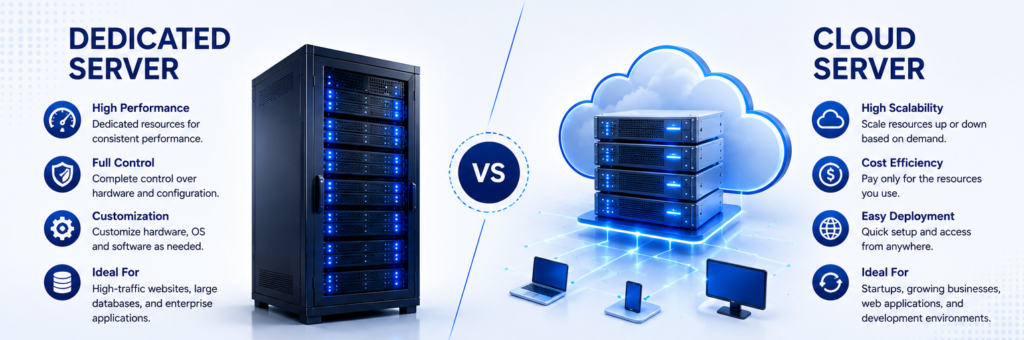
The main differences between these server solutions relate to resource allocation, scalability, management, and infrastructure costs.
- Performance: Dedicated servers provide exclusive access to physical hardware resources. Cloud server performance depends on the selected instance, underlying infrastructure, and resource allocation.
- Scalability: Cloud servers generally allow faster resource adjustments. Dedicated servers may require hardware upgrades or additional servers to accommodate growing workloads.
- Control: Dedicated servers offer extensive control over hardware and configuration. Cloud servers provide control over virtual resources, subject to the provider’s platform and service limits.
- Cost: Dedicated servers may involve higher upfront hardware or setup costs when self-hosted. Cloud servers commonly use subscription or usage-based pricing, although ongoing costs can increase with resource consumption.
- Maintenance: Dedicated server environments may require hardware maintenance and infrastructure management. Cloud providers maintain the underlying infrastructure, while customers may still be responsible for operating systems, applications, updates, and security settings.
When Should You Choose a Dedicated Server?
A dedicated server may be the right choice if your business needs predictable computing performance, specialised hardware configurations, or greater control over its infrastructure.
It can be suitable for enterprise applications, large databases, high-demand workloads, and businesses with specific compliance or data management requirements.
However, proper server installation, firewall configuration, access management, and routine maintenance are essential. Working with experienced server installation services can help businesses establish a stable and secure environment.
When Should You Choose a Cloud Server?
A cloud server is worth considering if your business requires flexibility, rapid deployment, or the ability to adjust resources as demand changes.
It can be useful for growing businesses, development environments, web applications, and organisations supporting distributed teams.
Professional cloud server installation and migration services can help businesses configure workloads, manage data transfers, establish backups, and reduce disruption during the transition. Businesses should also evaluate recurring costs, security responsibilities, backup arrangements, and provider reliability before choosing a cloud platform.
How to Choose the Right Server Solution
Before making a decision, evaluate your current workload, expected growth, security requirements, budget, and available IT expertise.
Consider the following questions:
- Does your business require consistent access to dedicated hardware resources?
- Will your computing requirements change frequently?
- Do you have the team to manage server security and maintenance?
- What are your backup, recovery, and uptime requirements?
- Would a physical, cloud, or hybrid infrastructure best support your operations?
A professional IT service provider can assess these requirements and recommend suitable server installation, configuration, migration, and maintenance solutions.
Conclusion
Both dedicated servers and cloud servers offer valuable benefits, but the right choice depends on your business requirements. Dedicated servers provide exclusive physical resources and extensive configuration control, while cloud servers offer flexibility and easier resource scaling.
With the right server infrastructure and professional IT support, businesses can improve operational reliability, strengthen data protection, and prepare for future growth.
Palies can help businesses evaluate their infrastructure requirements and identify suitable server installation, server setup, and IT infrastructure support solutions for their operational needs.