


Imagine reaching your office in the morning, opening Outlook to check important client emails, and suddenly finding that your inbox isn’t loading.
You refresh the page. Nothing happens.
You try accessing Outlook from another device, but the problem continues. Meanwhile, important business conversations, customer responses, meeting updates, and daily tasks are waiting.
Sounds familiar?
Recent Microsoft 365 service disruptions have highlighted how heavily businesses depend on cloud-based email and collaboration tools. During the November 12–13, 2026 incident, users across multiple regions experienced problems accessing Outlook and other Microsoft 365 services. Microsoft subsequently restored the affected services. Source: Microsoft incident updates. <Cite refs={[“turn955093search0″,”turn955093news18”]}/>
But here’s something important: Not every Outlook problem is caused by Microsoft. Your internet connection, computer settings, email configuration, or network infrastructure could also be responsible.
So, before assuming your email service is down, here are seven things your business should do when Outlook stops working.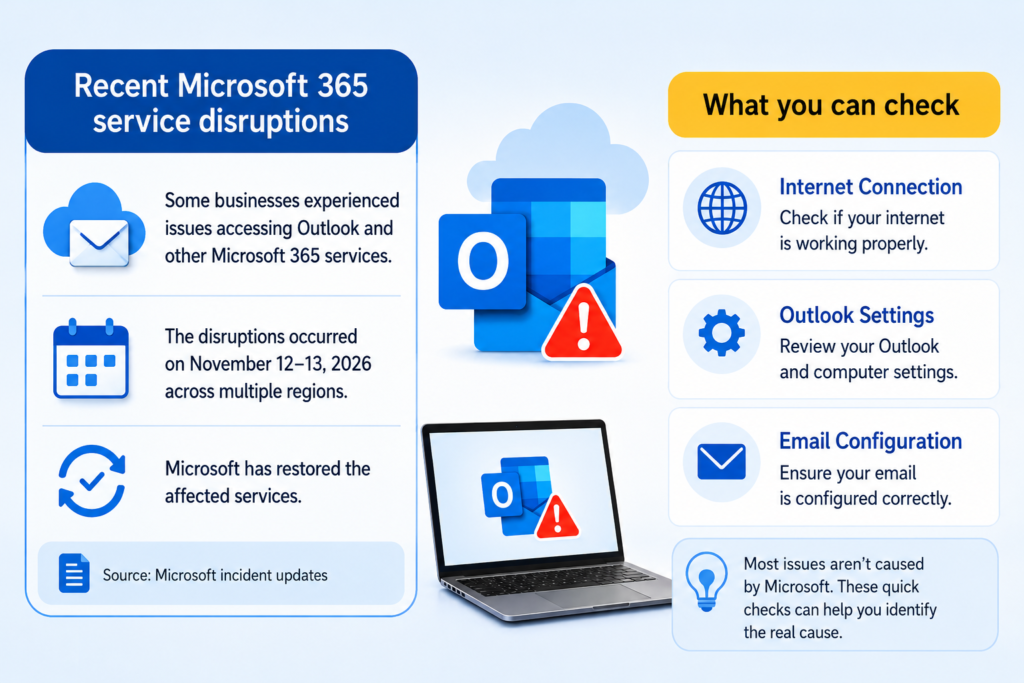
- First, Check Whether Outlook Is Down for Everyone
Before changing your computer settings or contacting technical support, find out whether the issue is affecting only you or multiple users.
If several employees cannot access Outlook at the same time, the problem may be related to Microsoft 365 or your organisation’s email environment.
What should you do?
- Check the official Microsoft 365 Service Health page.
- Ask other employees whether they are experiencing the same issue.
- Check for official Microsoft service notifications.
- Avoid repeatedly changing account settings during a confirmed service outage.
Quick tip: If Microsoft confirms a service disruption, wait for the official recovery updates rather than attempting unnecessary changes to your email configuration.
- Check Your Internet Connection Before Blaming Outlook
Sometimes Outlook appears to be down when the actual issue is an unstable internet connection.
If your office internet is slow or frequently disconnecting, Outlook may struggle to load emails, synchronise folders, or connect to the mail server.
What should you do?
- Open another website to check internet connectivity.
- Test Outlook using a different network, if possible.
- Restart your router if you identify a temporary connectivity issue.
- Try a wired Ethernet connection to check whether Wi-Fi is responsible.
If multiple online applications are also experiencing problems, your office network may need attention.
For persistent connectivity problems, explore Palies Network Installation Services.
- Try Accessing Outlook Through a Different Method
Is Outlook not opening on your desktop application?
Before assuming your email account is unavailable, try accessing it through another supported method.
For example, if you normally use the Outlook desktop application, try Outlook on the web.
What should you do?
- Open Outlook on the web.
- Sign in using your work email account.
- Check whether your inbox and recent messages are loading.
- Compare the experience across another authorised device.
If Outlook on the web works but the desktop application does not, the problem may be related to your local application, profile, or device configuration.
- Restart Outlook and Check for Application Issues
Outlook can sometimes stop responding because of temporary application errors, outdated software, add-in conflicts, or profile-related problems.
Simply closing and reopening Outlook may resolve a temporary issue.
What should you do?
- Close Outlook completely and reopen it.
- Restart your computer if the application remains unresponsive.
- Check whether Microsoft Office updates are available.
- Review recently installed add-ins if the issue started after a software change.
- Contact your IT administrator before making major account or profile changes.
If the issue continues only on a particular computer, professional desktop troubleshooting may help identify the underlying cause.
Explore Palies Desktop and Computer Support for relevant IT support services.
- Check Your Email Account and Storage Settings
Sometimes Outlook problems are related to account authentication, mailbox configuration, or storage limitations.
For example, an expired password, repeated sign-in failure, or mailbox storage restrictions can affect sending and receiving emails.
What should you do?
- Check whether Outlook is asking you to sign in again.
- Verify that you are using the correct work account.
- Check for mailbox storage warnings.
- Confirm whether emails are stuck in the Outbox.
- Contact your Microsoft 365 administrator if account access or mailbox configuration needs attention.
Avoid repeatedly entering passwords if you suspect an account security issue. Follow your organisation’s approved account recovery process.
- Don’t Let an Email Outage Stop Your Entire Business
This is where many businesses face a bigger challenge.
When email is unavailable, employees may struggle to communicate with clients, coordinate meetings, share documents, and manage important business activities.
But does an email outage really need to stop your entire workflow?
Not necessarily.
Businesses can prepare alternative communication and continuity arrangements before an outage happens.
What should your business consider?
- Maintain an approved alternative communication channel.
- Keep essential customer and vendor contact information accessible through authorised systems.
- Have an internal process for urgent approvals and client communication.
- Maintain appropriate backups of important business data.
- Document how employees should respond during major IT disruptions.
Remember, an email service outage and a data-loss incident are not the same thing. Cloud email availability, email retention, and independent data backup should be considered separately.
For additional protection, explore Palies Cloud Backup Solutions.
- Contact IT Support If the Problem Continues
If Outlook continues to malfunction even after checking service status, internet connectivity, and application settings, the issue may require technical investigation.
For businesses, repeated email problems should not be treated as isolated incidents without checking the underlying IT environment.
A technical assessment can help identify:
- Local computer and Outlook application issues.
- Network connectivity and configuration problems.
- DNS or authentication-related issues.
- Mailbox and account configuration problems.
- Server or infrastructure-related connectivity issues.
When should you seek professional help?
If multiple employees are affected, important business emails are delayed, or connectivity problems continue across devices, involve your IT support team rather than repeatedly changing settings.
Palies provides Remote Support and On-site Services to help businesses investigate and resolve IT-related problems.
What Should Your Business Do During an Email Outage?
Here’s a quick reference your team can follow whenever Outlook stops working.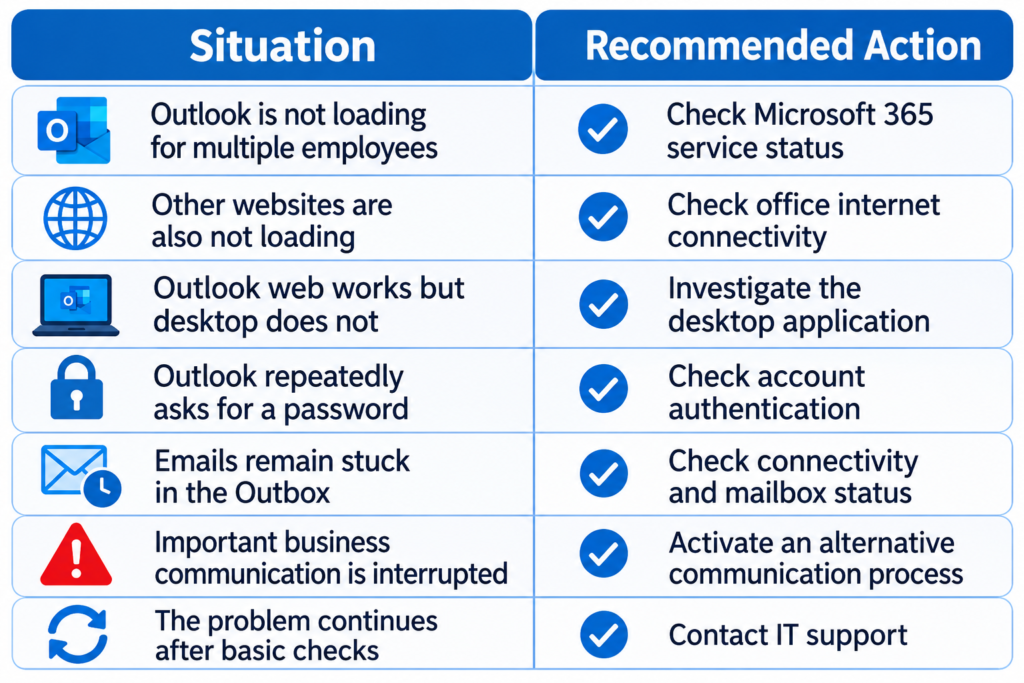
Is Your Business Prepared for the Next Email Outage?
Most businesses depend on email every working day. Client communication, quotations, invoices, approvals, project updates, and internal coordination often happen through a single email platform.
But depending entirely on one communication channel without a backup plan can create unnecessary business interruptions.
A practical IT continuity strategy should include:
- Reliable internet and network infrastructure.
- Regular computer and server maintenance.
- Appropriate data backup and recovery arrangements.
- Secure email and account management practices.
- Access to technical support when problems occur.
The goal is not simply to restore email access. It is to ensure that your business can continue operating even when an important technology service becomes temporarily unavailable.
Keep Your Business Connected with Palies IT Support
Technology problems rarely come with a convenient warning. Whether it is an Outlook access issue, an unstable office network, a desktop application problem, or a server-related interruption, identifying the actual cause is the first step towards a solution.
At Palies, we support businesses with networking, server maintenance, firewall maintenance, cloud backup, desktop services, and remote and on-site IT support.
Don’t wait for the next technical disruption to affect your daily operations.
Looking for reliable IT support in Coimbatore? Contact Palies to discuss your business IT requirements.